What the PxTrack EMR Software Company Has to Offer
Choosing an electronic medical records (EMR) system involves more than digitizing patient records. You need a solution that helps your clinic organize consultations, manage appointments, generate medical documents, and securely access patient information.
PxTrack brings these essential tasks together in one cloud-based system designed for medical professionals and clinics in the Philippines.
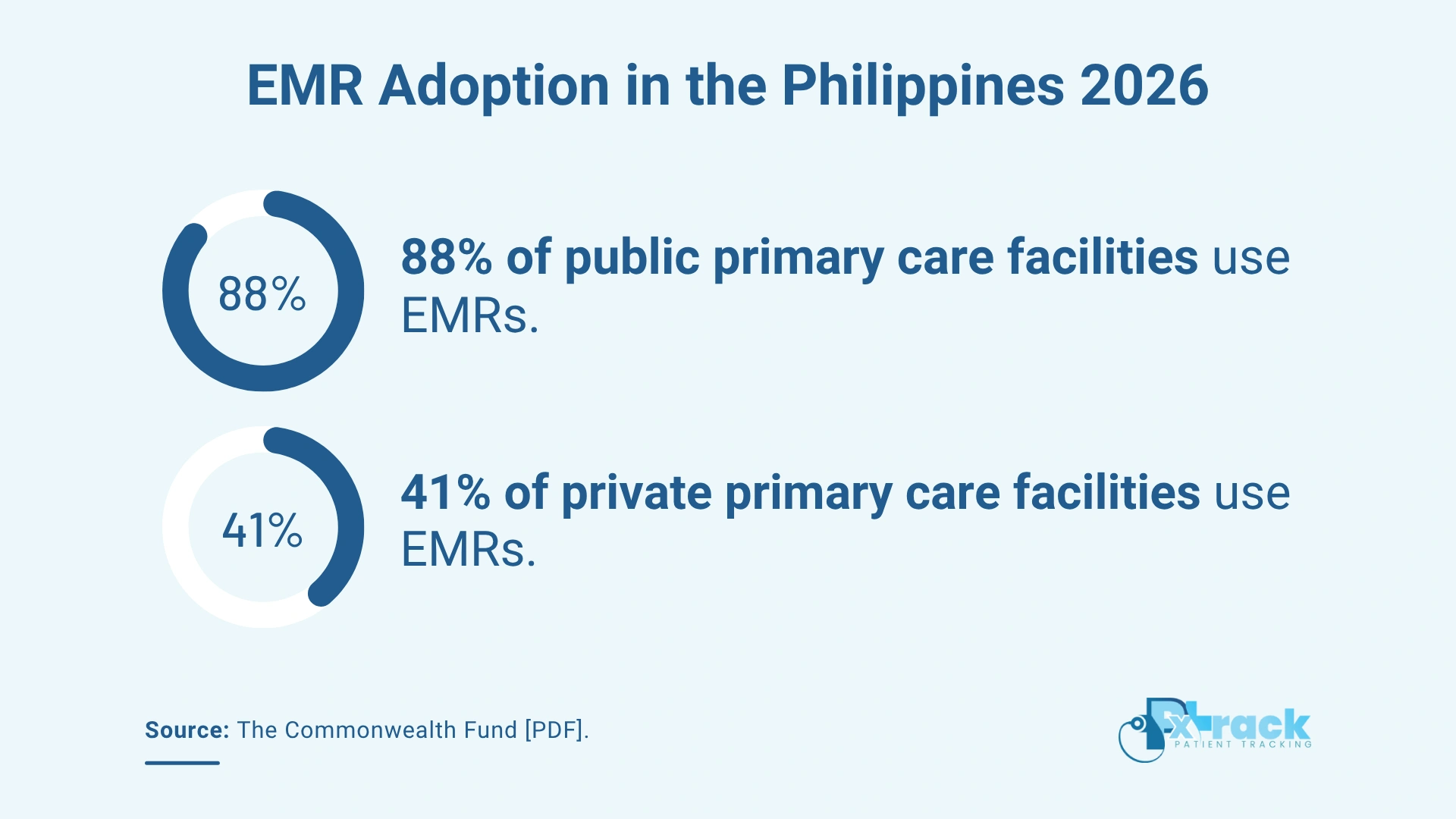
Source: The Commonwealth Fund [PDF].
Security, Accessibility, Flexibility
An electronic medical records system should help protect patient records and other confidential information. Therefore, EMR software should support responsible handling of patient data and provide safeguards for confidentiality, integrity, and availability.
Accessibility is also important. With a cloud-based EMR system, authorized users can access patient information over the internet, helping them retrieve records when needed.
Lastly, EMR software should be practical to use across supported devices, including desktop computers, laptops, tablets, and smartphones. This flexibility helps medical professionals access information and manage clinic tasks more conveniently.
PxTrack EMR Software Benefits
PxTrack EMR software helps doctors and other healthcare professionals track patients’ records. By organizing patient information in one centralized system, PxTrack makes it easier to retrieve medical history, review consultation details, and maintain records for future reference.
The EMR software is also available for OB-GYN doctors. Its features can help medical professionals organize patient information and manage routine clinic workflows.
Below are the primary benefits of incorporating PxTrack EMR software into your workflow.
1. Monitor Patients
Through the PxTrack EMR software, medical practitioners can record patient information and consultation details. The system also supports appointment scheduling.
With patient information and medical history organized in one place, doctors can review relevant records during consultations and refer to previous entries when needed. This helps maintain continuity in recordkeeping without relying solely on paper files.
2. Generate Reports
The EMR software can provide healthcare workers with summaries of patient consultations, examinations, and laboratory test results. It can also provide summaries of patient billing and payment information.
These records help medical professionals review patient information and track administrative details more conveniently. Organizing consultation and payment records in one system can also reduce the effort of searching through separate files.
3. Allow Ease of Use
One essential feature of PxTrack is its ease of navigation. With an internet connection, authorized users can access the EMR software from supported devices. Users can also print records when needed.
By making patient information easier to search, retrieve, and manage, PxTrack helps clinic staff spend less time handling paper records and switching between separate files. This can support a more organized workflow throughout the clinic day.
PxTrack EMR Software Features
PxTrack is a cloud-based EMR system that users can access online. It also has an advanced search feature that makes retrieving patient information easier, offering a practical alternative to manually browsing through piles of paper records.
When evaluating EMR software, consider which features support your clinic’s daily operations. Below are some of the features available through PxTrack:
- Consultation Management: Record consultation details and maintain documentation for future reference.
- Patient Records Management: Organize patient information and medical history in a centralized system.
- E-Ready Documents: Prepare and print supported medical documents, such as prescriptions and medical certificates.
- Clinic Management: Manage appointments and organize essential clinic records and administrative tasks.
- Security and Privacy: Use the system’s available safeguards while following appropriate practices for handling confidential patient information.
All these features help doctors and clinic staff manage patient records, appointments, medical documents, and billing information in one system.
See How PxTrack Fits Your Clinic’s Workflow
An EMR system can help healthcare providers organize patient information and reduce repetitive administrative work. PxTrack brings essential clinic functions together, helping medical professionals manage records, appointments, medical documents, and payment information more conveniently.
Want to see how PxTrack fits your clinic’s workflow? Book a FREE PxTrack Demo to explore the system and learn more about its features.

This article was updated on October 28, 2026.
Frequently Asked Questions
1. What is PxTrack EMR software?
PxTrack is a cloud-based electronic medical records (EMR) system designed for doctors and clinics in the Philippines. It helps medical professionals manage patient records, document consultations, schedule appointments, generate medical documents, and track billing and payments in one system.
2. What features does PxTrack EMR software offer?
PxTrack offers patient records management, consultation documentation, appointment scheduling, medical document generation, and billing and payment tracking. These features help doctors and clinic staff organize patient information and manage essential clinic tasks in one centralized system.
3. How much does PxTrack EMR software cost?
PxTrack offers subscription packages for different clinic needs. Visit the PxTrack pricing page to review the available packages and find an option that fits your practice. You can also book a FREE PxTrack Demo to explore the system’s features.